
You're Probably Using the Wrong Research Method
Most teams pick research methods the same way they pick dinner on a Tuesday. They find whatever's familiar, whatever's in the fridge. Heatmaps. Session recordings. Maybe a customer survey if they're feeling ambitious.
The problem is that familiarity has nothing to do with fit. Using the wrong method for the question produces something more dangerous than no research at all. You get confident, well-presented data that points in the wrong direction.
And here's what makes it expensive: you won't realize it until after the test loses.
So we built a database. Every research method we use at Speero, mapped against the business question it answers, the signal it produces, the effort it costs, and when to run it. This post is the thinking behind it.
But more than a method reference, this is a guide to the matching problem most teams get wrong. Later, I'll map each common business question to the specific method that answers it, and the specific method that will actively mislead you.
What Method Mismatch Actually Looks Like
A team notices a high drop-off rate at checkout. The conversion rate on the payment page is lower than it should be, and nobody knows why. Someone decides to run a customer survey.
They send it to their email list, get 150 responses, and ask things like "What stopped you from completing your purchase?" and "How was your checkout experience?"
The responses come back. Shipping costs. Trust concerns. A general "it was fine." The team optimizes shipping messaging, adds a trust badge, and runs an A/B test. It loses.
The actual problem was a broken promo code field that silently failed on mobile. It didn't throw an error. It just didn't apply the discount. Users who tried a code saw the total stay the same, assumed it was invalid, and left.
A customer survey can't surface this. The users who experienced the problem didn't buy anything, so they weren't on the email list.
The people who did buy don't specifically remember the promo code field. They got through checkout fine. The field worked for them.
The survey data pointed toward the wrong fix because it was built to answer the wrong question.
Session recordings would have caught the broken field in the first 10 videos. An on-site poll asking "Did you experience any issues today?" would have surfaced it within a week.
The right method for "why are users dropping off here" is behavioral observation, caught in the moment. A retrospective survey sent to existing customers will always miss it.
The survey costs you a week. The test built on its findings costs you a quarter.
Before You Pick a Method, Know Your Objective
If your team runs 20 research activities this quarter, how many will be genuine exploration vs. confirming what someone already decided? Most teams don't like their own answer.
Every research activity serves at least one of three objectives. Most serve two or three simultaneously, depending on how you use them. Understanding which objective you need going in prevents you from deploying a method to a question it can't answer.
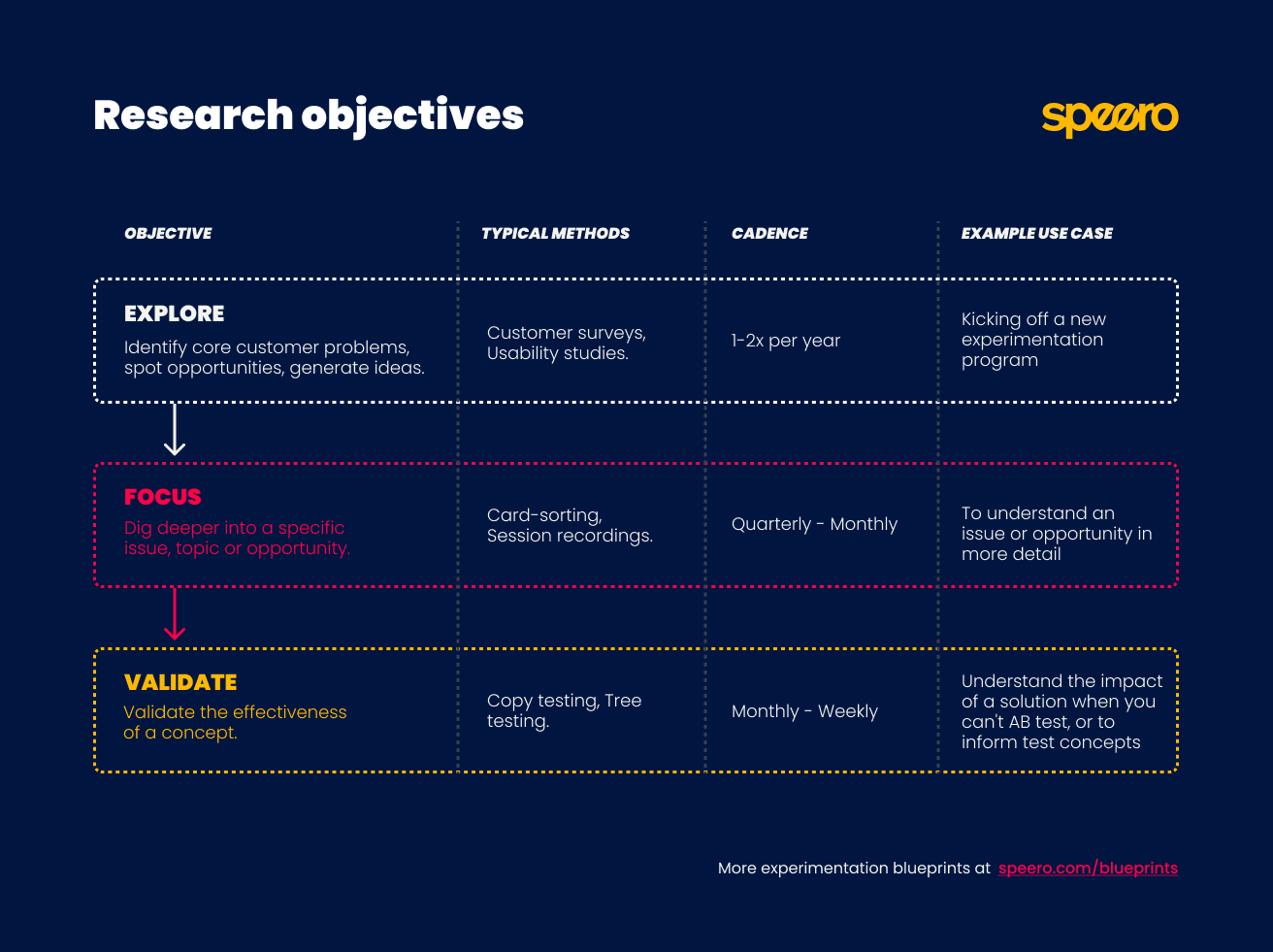
Speero's Research Objectives Blueprint defines the three objectives as:
Explore: You don't yet know where the problems are. You need breadth. You map the terrain, find where friction concentrates, and understand what's driving or blocking behavior.
Focus: You've identified a problem area and need to understand it deeply enough to design a solution. You know where the problem lives. Now you need to understand why.
Validate: You have a proposed solution. But you need evidence that it works before committing development resources or investing in a full A/B test.
Most teams live permanently in Validate. They skip Explore and Focus entirely, running A/B tests on ideas that haven't been investigated, and wonder why their win rate sits at 20%. That's like prescribing medication before running any diagnostics.
The discipline is matching your objective to where you actually are, not where you wish you were. Each method below carries an objective tag showing where it fits, and why.
The Research Methods
Analytics Analysis
Objectives: Explore, Focus
It's an Explore tool when you're mapping where friction lives across the whole site. You're scanning funnel leakage, entry and exit points, device splits, and traffic patterns to figure out where to aim your research budget.
It's a Focus tool when you've already identified a problem area and need to size it. You know checkout is leaking, and now you need to know how much, at which step, and on which devices.
Form analytics deserves a separate mention. If checkout is your problem area, form analytics is the fastest way to identify the specific field causing damage: where users abandon or hesitate. Baymard Institute's checkout usability research has consistently found that the design and flow of checkout is frequently the sole cause of purchase abandonment. Form analytics moves you from "this page has a problem" to "this field has a problem."
Don't use analytics to answer "why." It'll tell you that 40% of users drop off at step 3. It won't tell you whether they're confused, distracted, or just can't find the button. For the why, you need a different method.
Heatmaps and Session Recordings
Objectives: Explore, Focus
As an Explore method, session recordings help you scan broadly for friction across the site. You watch 30 to 50 sessions without a specific hypothesis, and friction patterns start surfacing on their own: repeated clicks on non-clickable elements, scroll reversals, form abandonment mid-field.
Heatmaps compress this into a visual summary (click maps, scroll maps, move maps) so you can spot attention patterns across thousands of sessions at once.
As a Focus method, they let you zoom into a specific page or flow once you know where to look. You've identified from analytics that the product page has a problem. Now you watch 20 sessions on that page specifically, looking for the behavioral pattern behind the number.
Here's where teams go wrong with recordings: they watch 5 sessions, see one user struggle, and call it an insight. One user clicking the wrong button is an anecdote. Eight users clicking the same wrong button is a signal.
Watch enough to see the pattern repeat, or you're just collecting stories.
On-Site Polls
Objectives: Explore, Focus
On-site polls work as an Explore tool when you're running them site-wide or across a whole funnel to find where friction concentrates.
They're a Focus tool when you're targeting a specific page or step to understand a problem you've already spotted in analytics or recordings.
The downside: polls disrupt the user experience. Think carefully about trigger logic.
Exit intent, time-on-page thresholds, and scroll depth work better than an instant interrupt on page load, especially if you've already got other pop-ups competing for the same sliver of goodwill.
Customer Surveys
Objectives: Explore, Focus
At the Explore stage, surveys are excellent for understanding who your customers are, what they came to solve, and what they struggled with.
At the Focus stage, they're useful for sizing a theme: confirming how widespread a problem is across your customer base before investing in deeper qualitative research.
A note on bias: existing customers already chose you. Their answers will be warmer and more forgiving than the perspective of someone on the fence. A survey sent to your customer list is a survey sent to people who already decided you were good enough.
The ones who bounced, compared you to a competitor, and picked them instead? They're not in your CRM. NNGroup's research on when surveys are the wrong method covers this sampling problem in depth.
Customer Interviews
Objectives: Explore, Focus
At the Explore stage, customer interviews help you discover motivations, fears, and decision-making patterns you didn't know to look for.
At the Focus stage, they help you understand a specific problem in enough depth to design a meaningful solution.
Recruit by customer type, since each segment tells a different story:
- Recent converters for understanding the purchase journey.
- Loyal customers for what keeps people coming back.
- Lapsed customers (bought once and disappeared) are often the most candid and most useful, since they have nothing to protect.
The lapsed segment is where the gold usually hides. These people liked you enough to buy once and then stopped.
They'll tell you exactly what went wrong, because they've already moved on and have no reason to be polite about it.
Live Chat and CRM Analysis
Objectives: Explore, Focus
Both work as Explore tools when you're scanning for themes you haven't considered.
They work as Focus tools when you're hunting for specific evidence around a problem you've already identified.
CRM data reflects what your sales team thought was worth typing, on the day they felt like typing it. Treat it as directional, not definitive.
Sales and Customer Service Interviews
Objectives: Explore
Primarily an Explore method. Use it to generate hypotheses and surface themes to investigate with direct customer research.
These conversations are filtered through a human intermediary, which introduces distortion. Your support team remembers the dramatic tickets. Not the quiet confusion that makes someone leave without ever reaching out.
Use it to sharpen the questions you take into customer interviews and surveys.
Remote Usability Studies
Objectives: Explore, Focus
As an Explore method, remote usability studies give you a broad scan of friction across a flow or set of pages, surfacing problems.
As a Focus method, they let you observe a specific interaction in detail once you've identified where friction concentrates.
You've spotted the problem area in analytics. Now you watch 5 users try to complete the specific task that's breaking down, and you see exactly where the flow fails.
The trade-off is that there's no moderator to course-correct when a participant misunderstands a task or to ask follow-up questions when something interesting happens. You get raw behavior, unfiltered and unguided. Sometimes that's exactly what you need. Sometimes a participant spends 4 minutes on the wrong page and you learn nothing except that the task instructions were ambiguous.
Moderated Usability Studies
Objectives: Explore, Focus
Moderated studies are particularly valuable at the Focus stage, when you need to understand a specific, complex behavior in depth.
They can also serve at Explore when you're new to a program and want rich, unprompted reactions to the full site experience.
Put a camera on someone and they suddenly become the most careful, articulate version of themselves. Which is exactly the version you don't need to study. That's the Hawthorne effect. People try harder, they're more patient, and they narrate their thinking more carefully than they would alone.
As a general rule: remote studies for breadth, moderated studies for depth.
Copy Testing
Objectives: Focus, Validate
Copy testing is particularly powerful for pricing pages, homepage headlines, and onboarding flows. Anywhere that messaging clarity directly affects conversion.
As a Focus method, it helps you understand precisely why a piece of copy isn't landing. You show parts of your website copy to your target audience and the structured responses reveal whether the message is understood, or it raises more questions than it answers.
As a Validate method, it confirms whether a new message direction works before you commit to a full design and A/B test cycle.
We've seen teams rewrite a value proposition based on interview insights, build it into a full page redesign, A/B test it, and lose. The new copy was clearer to the team. It wasn't clearer to the audience. A $200 copy test would have caught that before a month of design and development.
What copy testing can't do: tell you anything about design, UX, or functionality. Its scope is messaging. For everything else, you need a different method.
UX Heuristic Reviews
Objectives: Explore, Focus
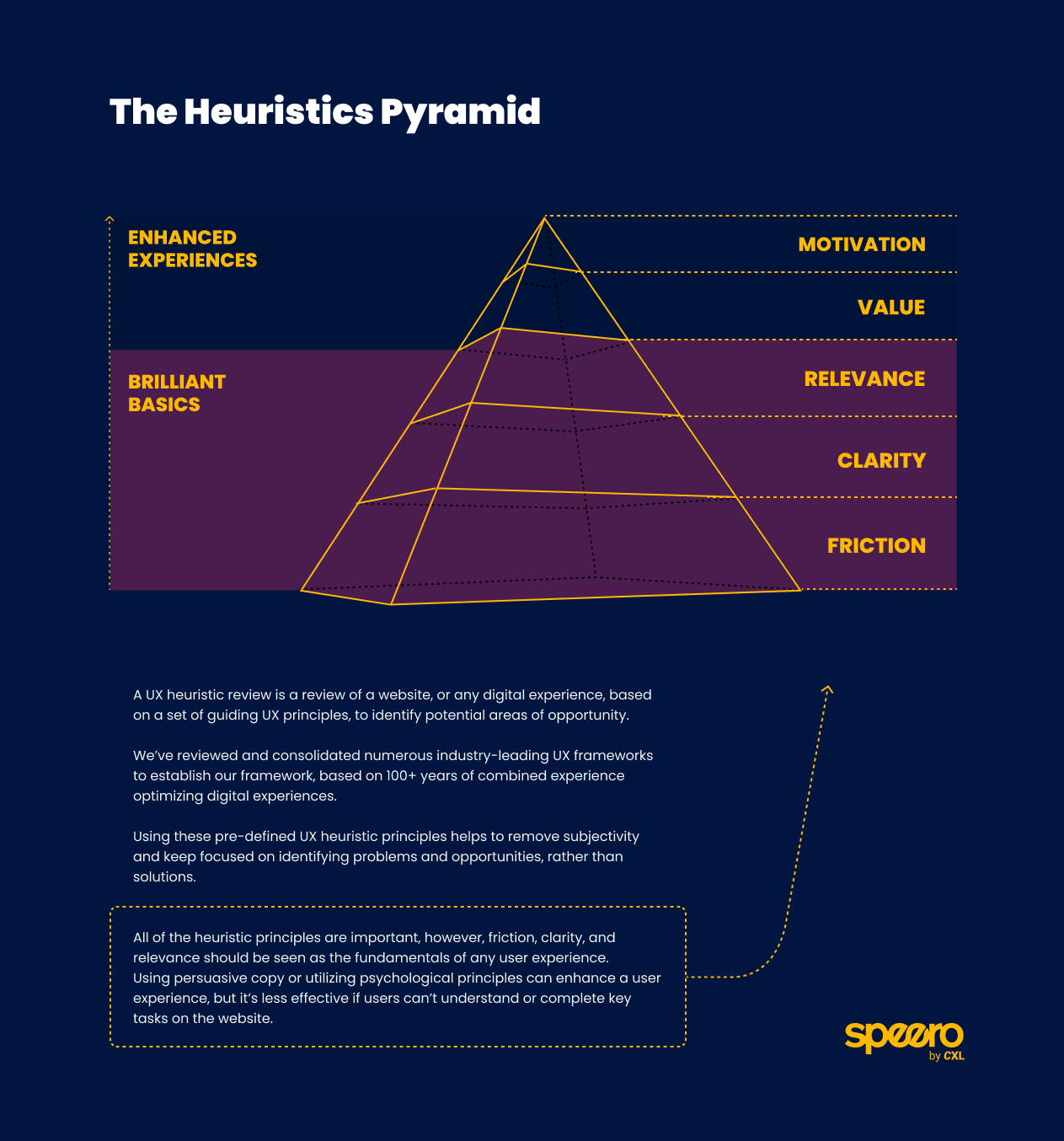
A heuristic review is the closest thing to having an opinion that still counts as research. That's both its limitation and its superpower. No recruitment, no incentive budget, no waiting for sessions to complete. Done in a day or two.
As an Explore method, it's a fast way to generate an initial list of hypotheses on an unfamiliar site. You'll quickly surface obvious friction points like broken flows, missing error states, cognitive overload, and confusing CTAs.
As a Focus method, it's useful for investigating a specific page or flow before committing to user research. You've identified from analytics that the pricing page leaks. A heuristic review tells you what might be wrong before you spend money on usability testing to confirm it.
At Speero, we often run heuristic reviews as part of collaborative workshops. Multiple reviewers evaluate the same flow independently, then compare findings. The disagreements are where the interesting problems live.
Competitor Reviews
Objectives: Explore
Competitor reviews sit exclusively at the Explore stage. They're most useful early in a program, when you're trying to understand the market context your users are comparing you against, or when you've hit a specific UX problem and want to see how others in your space approach it.
Amazon-style design patterns have been bolted onto industries where they create friction purely because they felt familiar and safe. Just because a competitor does something doesn't mean it works for them. Their conversion rate isn't public. Their context isn't yours.
Use competitor research as inspiration and context, not as a brief.
Card Sorting
Objectives: Focus, Validate
Card sorting is a Focus method when you've identified that users struggle to find content and need to understand how they'd naturally group it.
It becomes a Validate method when you've designed a proposed structure and want to confirm that your labeling system matches user mental models before you build it.
Tree Testing
Objectives: Focus, Validate
It serves at the Focus stage when you're investigating whether an existing navigation structure is causing findability problems. Task completion rates, time-to-find, and backtrack paths show you exactly where users get lost.
It's a Validate method when you're confirming that a redesigned structure actually works before building it.
Card sorting and tree testing are a natural pair. Card sorting tells you how users think the information should be grouped. Tree testing tells you whether the structure you built from that grouping actually works in practice. Run them in that order.
Prototype Testing
Objectives: Focus, Validate
As a Focus method, prototype testing reveals how users actually interact with a proposed design before any code has been written, surfacing usability problems in the flow itself.
As a Validate method, it confirms that a solution is ready to build, reducing the risk of investing development time in something that needs rework. A redesign iteration in Figma is almost free. The equivalent change after a developer has built the feature costs 6 to 100 times more, depending on how far into development the problem is caught.
The limitation is that a prototype is a simulation. Load times behave differently, real data doesn't populate as expected, and some friction only emerges under live conditions. We've watched users sail through a prototype and then stumble on the live version because real data made the layout break in ways the placeholder content never did.
Prototype testing de-risks development but doesn't replace A/B testing as a final validator.
Five-Second Tests and Design Preference Tests
Objectives: Focus, Validate
These are fast, cheap, and well-suited to one specific question: does this design communicate the right thing immediately?
Both methods sit at the Focus stage when you're evaluating which of several design directions is clearest.
A five-second test measures first-impression clarity: can users tell within 5 seconds what a page is for and what action it wants them to take? If not, no amount of downstream optimization will compensate. Research by Lindgaard et al. found that users form aesthetic judgments about a page in as little as 50 milliseconds. Five seconds is roughly how long you have before the back button starts looking attractive.
A design preference test narrows directions before you invest in building any of them.
They sit at Validate when you're checking a near-final design before it goes into development.
What these methods can't do: confirm that a solution actually converts better. They tell you whether the design communicates clearly. That's a prerequisite for conversion, and a meaningful one, but a separate question from whether the solution works.
A/B Testing
Objectives: Validate
A/B testing is the only method on this list that sits exclusively at the Validate stage. It's the final step in a chain, not a substitute for the research that should precede it.
Our ResearchXL Blueprint describes this clearly: qualitative research identifies the problem, quantitative research sizes it, and A/B testing validates the solution. Teams that skip to A/B testing without that chain are spending statistical significance on guesses.
Use an A/B test calculator to estimate the sample size you need before launching.
The Matching Guide: Question to Method
Here's where most teams get into real trouble. They pick the method that sounds right for the question. But some methods don't just fail to answer the question. They answer a different question convincingly. And you won't know until the test loses.
"Where on our site are users struggling?"
Use: Analytics, heatmaps, session recordings, on-site polls.
Avoid: Customer surveys. The people who struggled most aren't in your CRM. They left.
"Why are users abandoning at this specific step?"
Use: On-site poll (in the moment), remote usability study (observed behavior), moderated usability study (probed behavior).
Avoid: Customer survey. Respondents completed the purchase and made it into your CRM, so they're not representative of the problem.
"Who are our customers and what drove them to buy?"
Use: Customer interviews, customer surveys, win-loss CRM analysis.
Avoid: On-site polls, session recordings. Behavioral data can show you what someone did. It can't tell you why they decided to do it.
"Does our messaging resonate with our target audience?"
Use: Copy testing, customer interviews.
Avoid: On-site polls (too short to test messaging depth), A/B testing alone (tells you what won, not whether the message was understood).
"Is our navigation easy to use?"
Use: Card sorting (design the structure), tree testing (validate the structure), usability studies (behavior in context).
Avoid: Analytics alone. It shows where users go, not whether they meant to go there. A user landing on your FAQ page might look like engagement. It might also mean they couldn't find the answer anywhere else.
"Will this solution work before we build it?"
Use: Prototype testing, five-second test, design preference test.
Avoid: Customer survey. Respondents are answering a hypothetical, not reacting to a real design. People are terrible at predicting their own behavior. They'll tell you the layout "looks great" and then abandon it in practice.
"Does this solution actually move the needle?"
Use: A/B test.
Avoid: Everything else as a standalone answer. Other methods are prerequisites, not substitutes.
How to Choose a Method When Resources Are Limited
Before committing to any research method, it's worth mapping it against two dimensions from Speero's User Research Methods Blueprint: effort and value.
Value (also called signal strength) describes how confident you can be that the insight reflects real user behavior rather than bias, opinion, or coincidence.
A heuristic review sits at the low end. It's an informed opinion with a framework bolted on. A moderated usability study or A/B test sits at the high end: conditions are controlled, behavior is directly observed or measured.
Effort describes the true cost in terms of time, budget, recruitment complexity, and analysis work.
Diary studies and moderated usability studies are high-effort. On-site polls, heuristic reviews, and live chat analysis are low.
The blueprint uses these two dimensions together to help you plan the most appropriate methodology, plus identify opportunities to combine methods and increase the overall strength of your signal.
The practical implication when resources are limited: start with high-value, low-effort methods like session recordings, on-site polls, and live chat analysis. These give you enough direction to invest in higher-effort methods with confidence.
Running a moderated usability study on a problem you haven't yet located with analytics is like hiring a detective before you know a crime was committed. Expensive, and mostly aimless.
What Changes When You Get This Right
When teams consistently match method to question, three things shift.
Research stops being a graveyard. Insights connect to decisions. Test ideas are traceable back to data, not opinions. The conversation in planning meetings changes from "I think we should test X" to "We have three data sources pointing at this problem. Here's what we're going to do about it."
Win rates climb. The tests your team runs are built on specific, validated problems rather than guesswork or stakeholder preference. Our Program Metrics Blueprint tracks the % of tests backed by both qualitative and quantitative data. The higher that percentage, the higher the win rate.
If you want to benchmark where your own program stands, our experimentation maturity audit is a good starting point.
The program builds compounding knowledge. When every research activity is tagged by method, objective, and insight in a centralized repository, patterns emerge over time.
You learn which methods consistently produce actionable insights for your type of business. And you learn which questions your current stack can't answer. That self-awareness is itself a form of program maturity. It means your research gets sharper with every cycle, instead of restarting from scratch each quarter.
Where to Go From Here
Before you plan your next research sprint, answer one question: What am I actually trying to learn?
If the answer is vague ("we want to understand users better"), go back a step. Vague questions produce vague data. Ask a vague question, and the data gives you a polite shrug back.
If your answer involves any version of "we need to know why users drop off at this step," put the survey down. Open a session recording tool. Watch 10 videos. You'll know more in an hour than a survey sent to the wrong audience could tell you in a month.
If you're looking to build a research practice that feeds directly into experimentation, take a look at our case studies to see how this plays out in practice, or explore the full list of A/B testing tools we recommend for the validation stage.
Go look at your last 5 test briefs. Count how many cite a specific research method and a specific finding. If that number is below 3, you now know exactly where the problem is.


.svg)
