
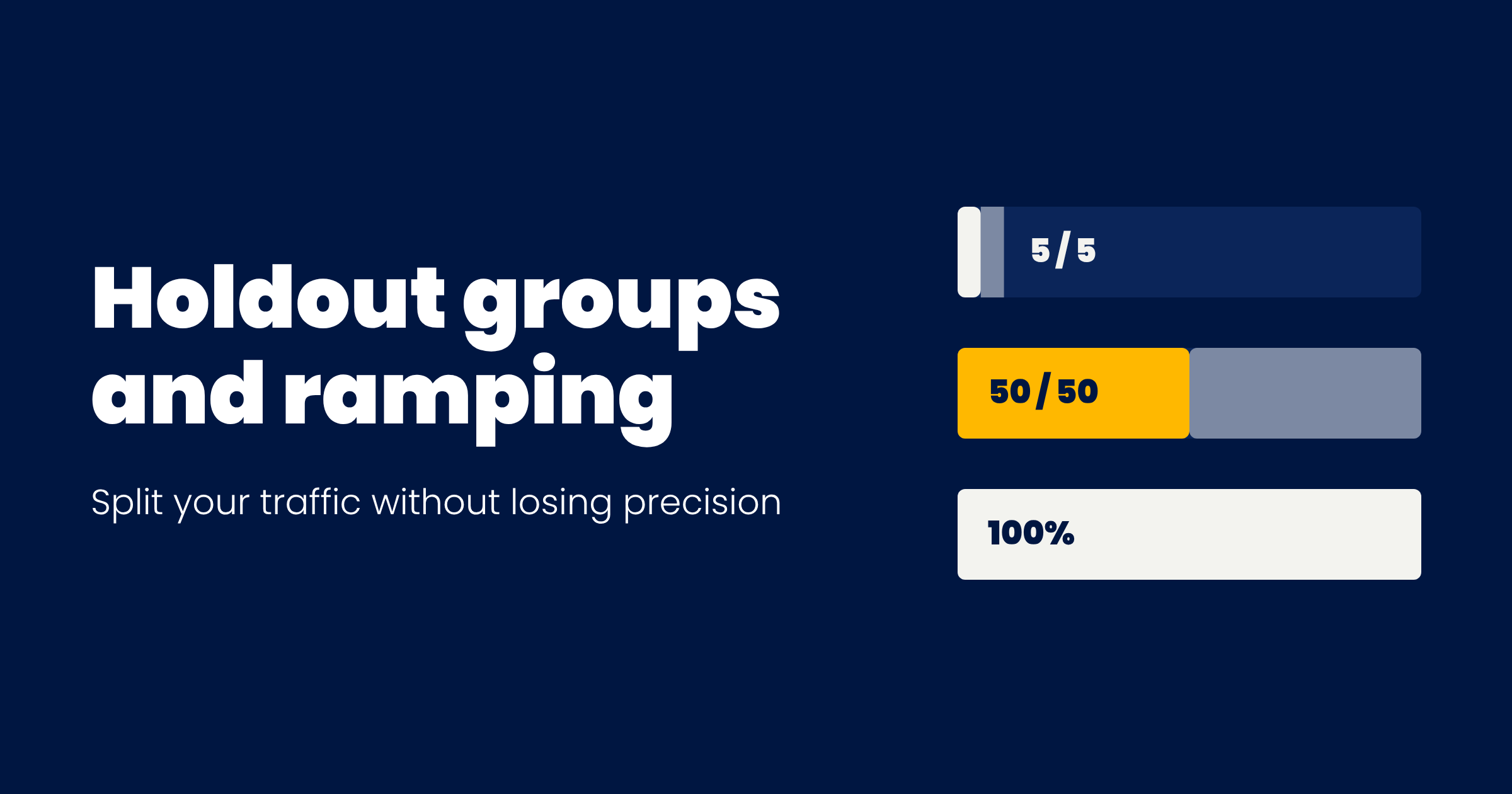
Your team probably uses the word "holdout" for 3 different jobs. Or they could...which is frustrating.
One is a small first exposure to catch bugs. Another is a test where most users get the new version. The third is a group you keep on the old experience for months to see if an effect lasts.
Each job needs a different split and a different duration. Mix them up and bad things can happen. You ship to everyone on day 1 and find the bug in production. Or you run a 90/10 split as your only measurement and wait a month for a less precise answer than 2 weeks at 50/50 would have given you.
The TL;DR: give the new experience to a small share for a few days to catch bugs, measure at an equal split for the full planned runtime, then ship to everyone. Keep a long-term holdout only when you have a specific long-term question, and decide that before launch.
The rest of this post covers why 50/50 wins on precision, how to read a test where the decision to ship is already made, and how to size an unequal split when the business won't accept 50/50.
First, we start with....
The 4 phases of a launch
Ron Kohavi, Diane Tang and Ya Xu split a launch into 4 phases in my personal bible for testing, Trustworthy Online Controlled Experiments, building on the SQR framework for balancing speed, quality and risk from LinkedIn's experimentation team. Each phase has one job.
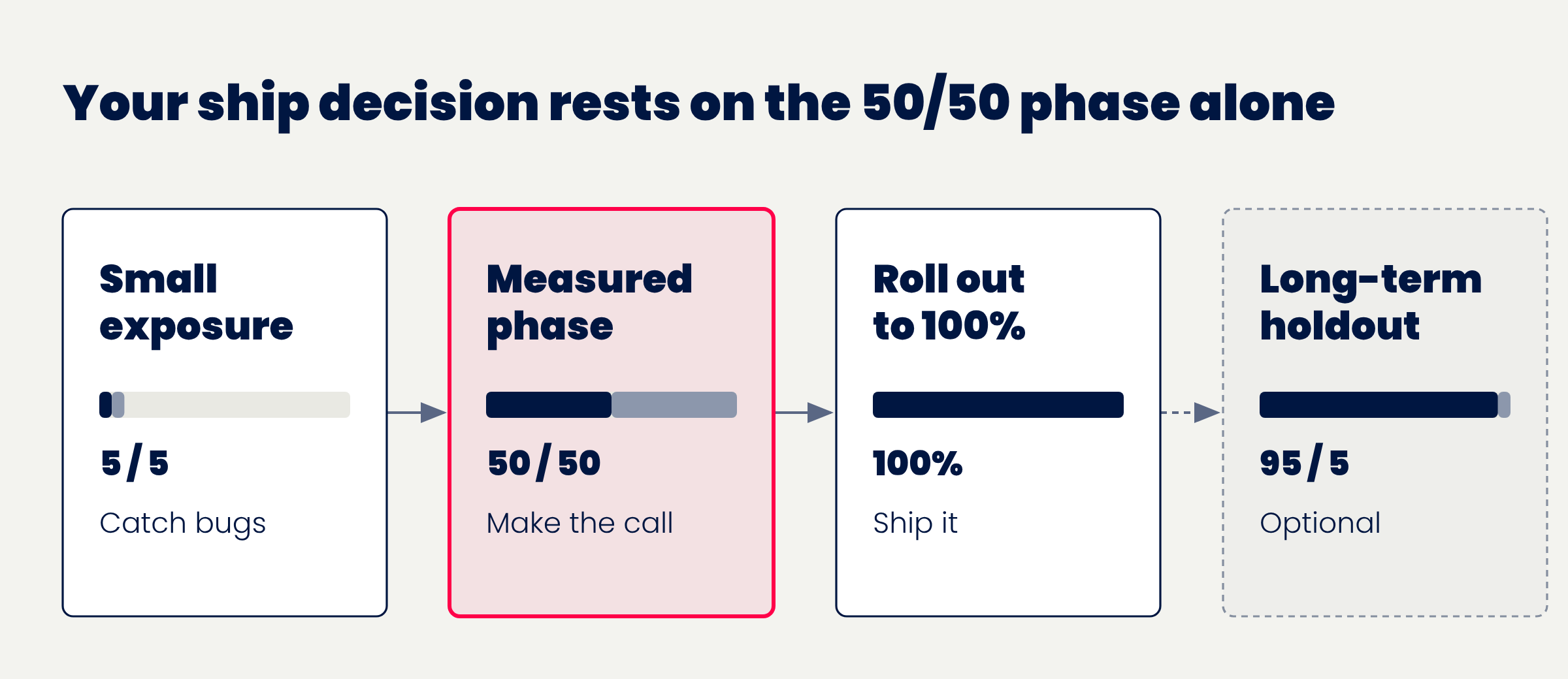
- Small exposure, to limit damage. This is the QAQC, a few percent of users, or internal users, for hours or days. You're looking for bugs, errors and obvious harm. The sample is too small and too unusual to read as a result ofc.
- The measured phase. The split that gives the most precise answer, run for the planned runtime. Your decision rests on this phase alone.
- Short steps to 100%, only if the system needs checking under more load.
- A long-term holdout, when needed. A small group stays on the old experience for weeks or months so you can see whether the effect lasts.
Most of the confusion in programs comes from asking phase 1 or phase 4 to do phase 2's job.
Why 50/50 beats 90/10
An equal split gives you the most precise answer for the traffic you have.
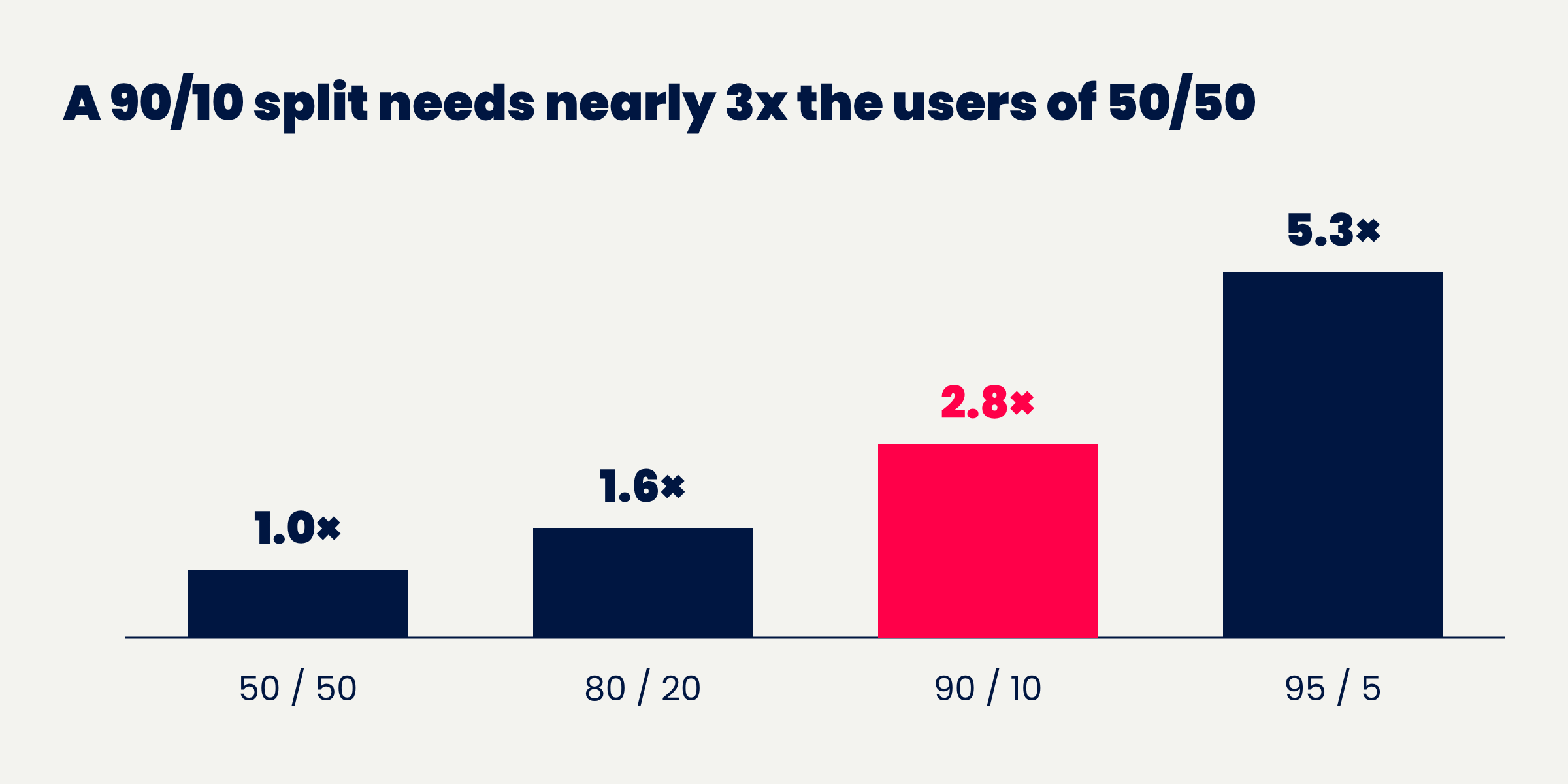
The noise in a comparison depends mostly on the smaller group. With a share q of users in treatment, the variance of the difference scales with 1 / (q × (1 − q)). That number is lowest at 50/50.
So an 80/20 split needs about 1.6 times the users of 50/50 to detect the same effect. A 90/10 split needs about 2.8 times.
Kohavi and his co-authors call the belief that holdouts should keep 90% or 95% of users in treatment "a misconception" when the effect you care about is small, because running longer seldom makes up the difference.
That's the counter-intuitive part for most teams. A 90/10 holdout feels cautious. In practice it's the slow, blurry version of the same test. (read that again for those in the back!)
When the decision to ship is already made
Plenty of tests aren't asking "is this better?" The change is shipping regardless (a platform migration, a compliance fix, a redesign leadership has signed off on). The real question is whether it's worse by more than you can accept.
That's a different test design. Speero's Hypothesis Testing vs "Do No Harm" blueprint lays out the difference. A hypothesis test asks if one variant is significantly better. A do-no-harm (non-inferiority) test asks if it's worse by more than a margin you set in advance.
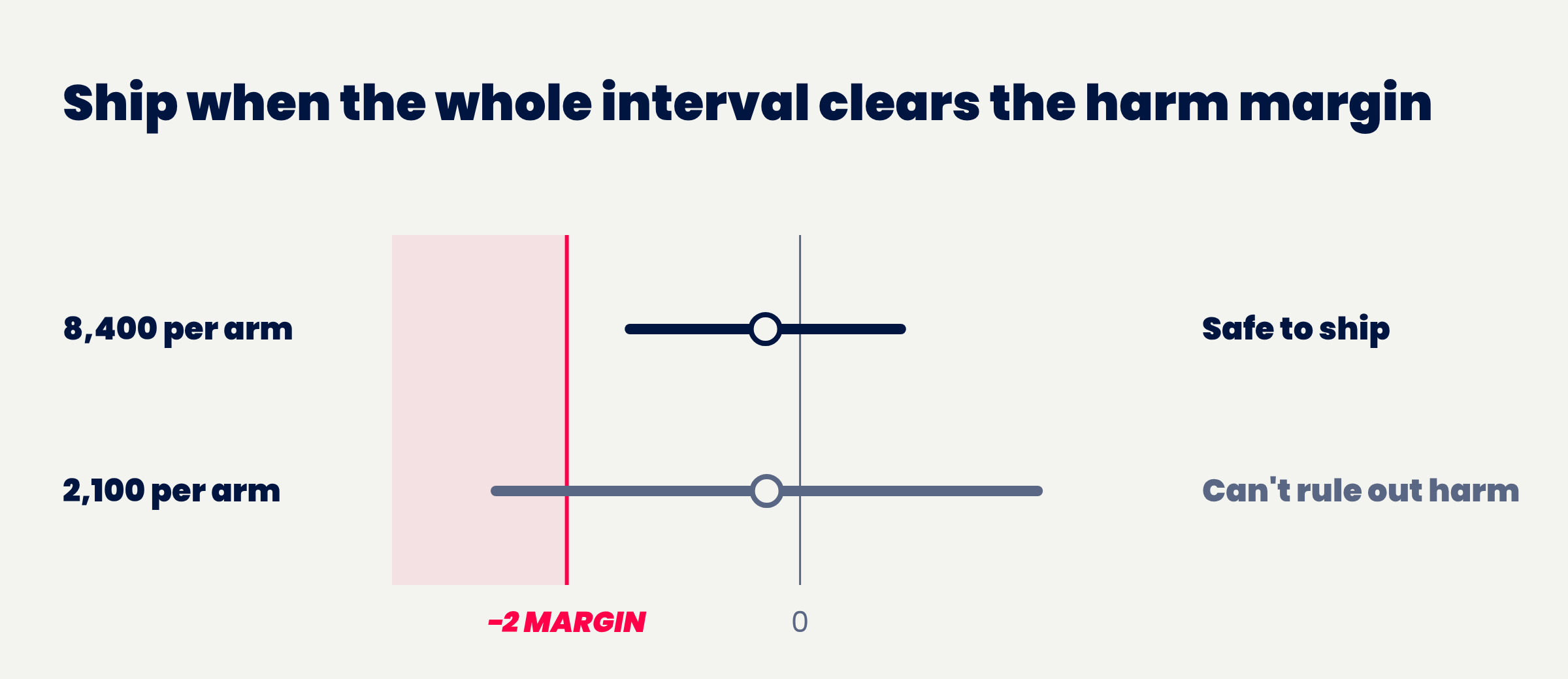
You answer a harm question with a harm margin agreed before launch. It's the largest drop on each decision metric you'd still accept. At readout, you compare the low end of the confidence interval with the margin.
This matters because a result that isn't significant doesn't show the change is safe. An underpowered test fails to reach significance on almost anything. If you've ever read an inconclusive A/B test result as a green light, you've made this mistake (most of us have).
The margin is a business call, and it should scale with risk. A checkout change deserves a tighter margin than a footer link. That's the same logic behind risk-based confidence thresholds: one bar for every test slows the low-risk work and under-protects the high-risk work. For more on the method, Analytics-Toolkit's case for non-inferiority tests and Stitch Fix's write-up on non-inferiority testing are both worth your time.
Each change of split starts a new phase
Users who arrive during a 5% ramp and users who arrive at 50/50 were assigned under different conditions. Pooling them can bias your result, and in bad cases it can flip the sign.
So treat every change of split as a new phase, and analyze the measured phase on its own.
Most feature-flag tools let you run this cleanly with 3 groups: variant, control, and "out of experiment" (users who see the current experience and aren't analysed). Start at 5% variant and 5% control with everyone else out of experiment, then raise both arms together to 50/50.
In GrowthBook, for example, you start a new phase when the weights change and read only the measured phase. For an experiment imported from your warehouse, GrowthBook infers the split from the data. Set the weights by hand, or the SRM check compares against whatever ratio happened to occur.
Two rules sit underneath all of this. First, set the harm margin, the split and the runtime of the measured phase before launch, because choosing them after you've seen data lets the data pick the answer. Second, measure at an equal split unless the business needs most users on the new version during the test, and accept the longer runtime that comes with that choice.
If your pre-launch checklist doesn't force those decisions, the 3 questions every test should answer before it launches are a good place to bolt them on.
Decision guide
- If you don't yet know whether the new experience breaks anything: Expose a small share (internal users, or a few percent) for a few days and watch errors and guardrails before stepping up. A bug found at a few percent affects few users.
- If you're in the measured phase: Run at an equal split for at least your minimum runtime, counted from the start of this phase. Ramp days don't count. Only the measured phase is analysed, and the runtime has to cover full weekly cycles at the final split.
- If existing users will meet a changed workflow: Plan a longer measured phase and look at the effect week by week. Experienced users often do worse at first with something new, or better because it's new. A short test reads that early reaction as the effect.
- If the change ships regardless and the question is whether it hurts: Agree a harm margin per decision metric before launch, and compare the low end of the interval with it at readout. The margin defines what harm means. Without one, the test can't show the change is safe.
- If most users need the new version during the measured phase: Use an unequal split such as 80/20 and size the runtime for it. Avoid 90/10 or smaller holdbacks when the effect is small. A 90/10 split needs nearly 3 times the users of 50/50.
- If a change tested on one population is going to another (new users, then existing users): Run it as a new test with its own flag key and pre-registration. The first result says little about people with different habits, and adding them mid-test changes who is being compared.
- If the split or targeting changes during the run: Record it as a new phase and analyse the measured phase on its own. Pooling phases with different splits can reverse the sign of the result.
- If the effect may fade or grow, the decision metric lags (retention, say), or adoption takes time: Keep a long-term holdout with its question, size and end date written down before launch. A long-term holdout is only useful if its question is named before launch.
- If the new version is clearly better and nothing long-term is in question: Ship to 100% with no holdout. Holding users back costs revenue and experience, which is hard to justify when they pay the same.
- If new features will ship only on the new version during the holdout: End the holdout before they ship. After that, the holdout compares 2 different products.
- If you want the combined effect of a stream of changes: Set up a program holdout before the work starts. A holdout started after the changes shipped moves users who already had them back to the old version.
Which tools have native holdouts
Quick detour. This came up while we were updating our A/B testing tools hub, and it ties straight back to the naming problem at the top of this post. Vendors use "holdout" for different jobs too.
For this table I'm only counting the long-term kind, the phase 4 holdout and the program holdout. That's a group you keep out of many experiments or features so you can measure what they add up to over time. Some personalization tools (Monetate and Contentful, for example) use "holdout" for the control slice inside a single campaign. That's useful, but it's a different job, so it's not in here.
| Tool | What you get | Scope and caveats |
|---|---|---|
| GrowthBook | Holdouts that divert a set share of traffic away from features and experiments | Enterprise plan |
| Statsig | Global holdouts (added automatically to new features) and selected holdouts | Also available through the Console API |
| Optimizely | Global and local holdouts | Feature Experimentation. Native global holdouts shipped March 2026 |
| LaunchDarkly | Excludes a share of your audience from all experiments for a set period | For Experimentation customers. Holdouts API is in beta |
| Amplitude | Holdout groups that can mix web and feature experiments | Amplitude Experiment |
| Datadog (Eppo) | Global and selective holdouts | Analysis-only mode if you bring your own assignment |
| PostHog | Reusable holdout groups you attach to experiments | Also manageable through API and MCP |
| Kameleoon | Project-level holdouts | Native in Feature Experimentation. Web experiments use a tagged-experiment setup |
| VWO | Global and selective holdouts | Feature Experimentation, Enterprise plan, early access |
| Webflow Optimize | Sitewide holdout that never sees optimized variations | AI Optimize |
As of October 2026. Vendors ship fast, so check the hub for the current list.
The pattern was pretty clear when we went through all 32 tools in the hub. Feature-flag and product experimentation platforms mostly have this built in. Web CRO tools mostly don't.
If yours isn't on the list, you can usually build one with an audience rule that excludes a random slice of users from every test. That works, tbh. But you own the bookkeeping: keeping the group stable, excluding it from every new test, and ending it on the date you wrote down. IMO native support mostly saves you from forgetting one of those. It doesn't fix the bigger mistake from earlier in the post, which is running a holdout with no named question.
How to set up a ramp
- Write each step into your rollout plan before launch: its share, its length, and what stops it (an error rate, a guardrail breach, an SRM flag).
- Raise control and variant together and leave everyone else out of the test, so the 2 arms stay the same size at every step.
- Use the small-exposure step for health checks only. Confirm exposure is logged, the split matches the configuration, and errors and guardrails look normal. Don't read the primary metric.
- Move to the measured split once health is confirmed, and start the runtime clock there.
- Check the split against the configured weights at every step, unequal ones included.
Step 3 is where a solid A/B testing QA process earns its keep. Step 5 is a sample ratio mismatch check, and if it fails, this guide to A/A tests versus instrumentation checks helps you work out which diagnostic to reach for first.
Your guardrails during the ramp should be the metrics that would tell you something broke (errors, support contacts, page load time). If your team hasn't agreed on those yet, start with the experimentation metrics that matter.
How to size an unequal split
Size the measured phase as you would any test, then multiply by the cost of the split. The multiplier is (1 / q + 1 / (1 − q)) divided by 4, whatever the metric.
- 50 / 50: 1.0× the users
- 80 / 20: about 1.6× the users
- 90 / 10: about 2.8× the users
- 95 / 5: about 5.3× the users
A 95/5 holdback needs more than 5 times the traffic of an even split. That's a 2-week test stretched to roughly 2.5 months.
For a harm question, size the test on the harm margin. A tight margin can push the runtime past what anyone will wait for, so agree a margin the business can live with before launch. Speero's A/B pre-test calculator handles the base sample size, and the multiplier above handles the split.
A worked example
All numbers below are illustrative. They aren't from a real test. The sample sizes and interval are calculated from those numbers.
A SaaS team redesigns its workspace settings so changes save automatically, with an undo option. Before, users clicked Save to confirm each change. The redesign was tested on new signups and is shipping regardless. Now the team wants to take it to existing accounts, who are used to confirming every change.
Framing. This is a harm question on a new population, so it gets its own test and flag key. Before launch, the team sets the primary metric as the share of exposed accounts that invite a teammate within 7 days. They agree that a drop of more than 2 percentage points from a baseline of about 30% is unacceptable.
Sizing. With one-sided 95% confidence and 80% power, an equal split needs about 13,000 accounts. Around 1,200 eligible accounts reach the settings page each day, so that's about 11 days. The team's minimum runtime of 2 full weeks rounds it up to 14. An 80/20 split would need about 20,300 accounts (around 17 days), and 90/10 about 36,100 (around 30 days).
Ramp. 3 days at 5% variant and 5% control, watching errors, undo rates and support contacts. Nothing unusual, and the split matches its configuration.
Measured phase. 50/50 for 14 days, checked week by week. 8,400 accounts per arm: 2,520 invite a teammate in control (30.0%) and 2,495 in the variant (29.7%). The difference is −0.3 points, with a 90% confidence interval from −1.5 to +0.9 points.
Decision. The low end, −1.5 points, sits above the −2 point margin, and the second week looks no worse than the first. The change ships to all existing accounts with no long-term holdout. There's no long-term question, and the old version won't get new features.
What the team didn't do matters just as much. They didn't launch to 100% on the strength of the new-signup result. They didn't run a 90/10 holdout for a month. And they didn't treat "not significant" as proof that nothing got worse.
Common mistakes
Reading the small first exposure as the result. The sample is too small and too unusual.
Using a 90/10 holdout as the measurement. It answers the same question as 50/50 with far less precision per day.
Treating "not significant" as "no harm". Without a margin, an underpowered test is not significant about anything.
Pooling ramp days with the measured phase. Users assigned under different splits aren't comparable.
Adding a new population to a running test. It changes who is being compared halfway through.
Keeping a long-term holdout out of habit. With no named question, it withholds the new version and answers nothing. GrowthBook's quarter-long holdouts feature is built for program-level questions across many features, and a single test's holdback doesn't need it.
Starting a holdout after the change has shipped. It moves users who already had the change back to the old version.
Your checklist
Before launch
- Ramp steps, lengths and stop criteria are in the rollout plan
- Measured split, runtime and (for a harm question) the margin per decision metric are in the pre-registration
- A new population has its own flag key and record
- Any long-term holdout has its question, size and end date written down
During the run
- Split checked against the configured weights at every step
- Each change of split recorded as a new phase
- Primary metric not read during the small-exposure step
At readout
- Only the measured phase is analysed
- For a harm question, the low end of the interval is compared with the margin
- Any long-term holdout ends on its planned date, and held-back users are released
Where to go from here
Pick the next test in your roadmap that's shipping regardless of the result. Before it launches, write down 3 numbers: the harm margin, the measured split, and the runtime of the measured phase.
If you can't agree on the margin, that's useful information. It usually means your team hasn't decided what "worse" would cost, and the Should I Run an A/B Test? blueprint is a good way to start that conversation. You'll find more decision frameworks like this one in Speero's Blueprints library.





.svg)
